code
نسخ
اقتباس
عرض
تنزيل
								<!DOCTYPE html>
<html lang=\"en\">
<head>
  <title>Bootstrap Example</title>
  <meta charset=\"utf-8\">
  <meta name=\"viewport\" content=\"width=device-width, initial-scale=1\">
  <link rel=\"stylesheet\" href=\"https://maxcdn.bootstrapcdn.com/bootstrap/3.4.1/css/bootstrap.min.css\">
  <script src=\"https://ajax.googleapis.com/ajax/libs/jquery/3.5.1/jquery.min.js\"></script>
  <script src=\"https://maxcdn.bootstrapcdn.com/bootstrap/3.4.1/js/bootstrap.min.js\"></script>
</head>
<body>

<div class=\"container\">
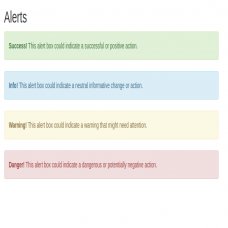
  <h2>Alerts</h2>
  <div class=\"alert alert-success\">
    <strong>Success!</strong> This alert box could indicate a successful or positive action.
  </div>
  <div class=\"alert alert-info\">
    <strong>Info!</strong> This alert box could indicate a neutral informative change or action.
  </div>
  <div class=\"alert alert-warning\">
    <strong>Warning!</strong> This alert box could indicate a warning that might need attention.
  </div>
  <div class=\"alert alert-danger\">
    <strong>Danger!</strong> This alert box could indicate a dangerous or potentially negative action.
  </div>
</div>

</body>
</html>