code
نسخ
اقتباس
عرض
تنزيل
								<!DOCTYPE html>
<html lang=\"en\">
<head>
  <title>Bootstrap Example</title>
  <meta charset=\"utf-8\">
  <meta name=\"viewport\" content=\"width=device-width, initial-scale=1\">
  <link rel=\"stylesheet\" href=\"https://maxcdn.bootstrapcdn.com/bootstrap/3.4.1/css/bootstrap.min.css\">
  <script src=\"https://ajax.googleapis.com/ajax/libs/jquery/3.5.1/jquery.min.js\"></script>
  <script src=\"https://maxcdn.bootstrapcdn.com/bootstrap/3.4.1/js/bootstrap.min.js\"></script>
</head>
<body>

<nav class=\"navbar navbar-default\">
  <div class=\"container-fluid\">
    <div class=\"navbar-header\">
      <a class=\"navbar-brand\" href=\"#\">WebSiteName</a>
    </div>
    <ul class=\"nav navbar-nav\">
      <li class=\"active\"><a href=\"#\">Home</a></li>
      <li><a href=\"#\">Page 1</a></li>
      <li><a href=\"#\">Page 2</a></li>
      <li><a href=\"#\">Page 3</a></li>
    </ul>
  </div>
</nav>

<div class=\"container\">
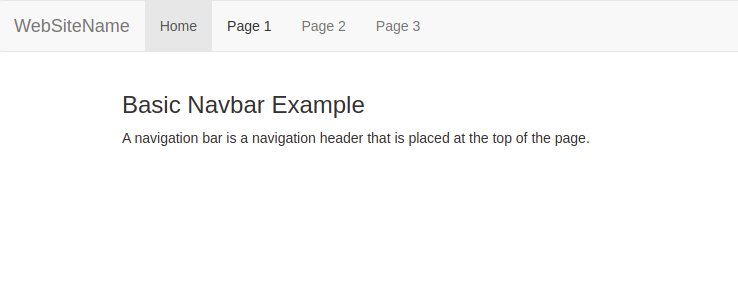
  <h3>Basic Navbar Example</h3>
  <p>A navigation bar is a navigation header that is placed at the top of the page.</p>
</div>

</body>
</html>
code
نسخ
اقتباس
عرض
تنزيل
								<!DOCTYPE html>
<html lang=\"en\">
<head>
  <title>Bootstrap Example</title>
  <meta charset=\"utf-8\">
  <meta name=\"viewport\" content=\"width=device-width, initial-scale=1\">
  <link rel=\"stylesheet\" href=\"https://maxcdn.bootstrapcdn.com/bootstrap/3.4.1/css/bootstrap.min.css\">
  <script src=\"https://ajax.googleapis.com/ajax/libs/jquery/3.5.1/jquery.min.js\"></script>
  <script src=\"https://maxcdn.bootstrapcdn.com/bootstrap/3.4.1/js/bootstrap.min.js\"></script>
</head>
<body>

<nav class=\"navbar navbar-inverse\">
  <div class=\"container-fluid\">
    <div class=\"navbar-header\">
      <a class=\"navbar-brand\" href=\"#\">WebSiteName</a>
    </div>
    <ul class=\"nav navbar-nav\">
      <li class=\"active\"><a href=\"#\">Home</a></li>
      <li class=\"dropdown\"><a class=\"dropdown-toggle\" data-toggle=\"dropdown\" href=\"#\">Page 1 <span class=\"caret\"></span></a>
        <ul class=\"dropdown-menu\">
          <li><a href=\"#\">Page 1-1</a></li>
          <li><a href=\"#\">Page 1-2</a></li>
          <li><a href=\"#\">Page 1-3</a></li>
        </ul>
      </li>
      <li><a href=\"#\">Page 2</a></li>
    </ul>
    <ul class=\"nav navbar-nav navbar-right\">
      <li><a href=\"#\"><span class=\"glyphicon glyphicon-user\"></span> Sign Up</a></li>
      <li><a href=\"#\"><span class=\"glyphicon glyphicon-log-in\"></span> Login</a></li>
    </ul>
  </div>
</nav>

<div class=\"container\">
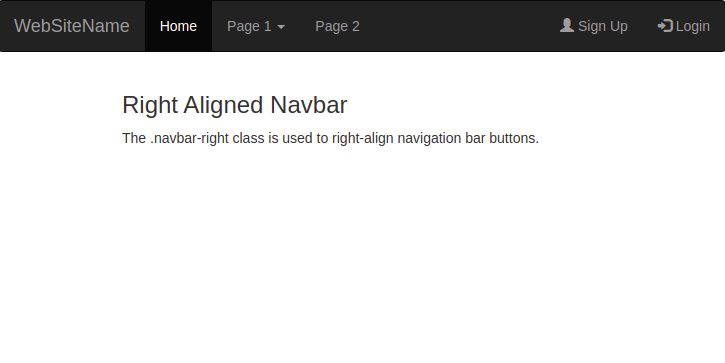
  <h3>Right Aligned Navbar</h3>
  <p>The .navbar-right class is used to right-align navigation bar buttons.</p>
</div>

</body>
</html>
code
نسخ
اقتباس
عرض
تنزيل
								<!DOCTYPE html>
<html lang=\"en\">
<head>
  <title>Bootstrap Example</title>
  <meta charset=\"utf-8\">
  <meta name=\"viewport\" content=\"width=device-width, initial-scale=1\">
  <link rel=\"stylesheet\" href=\"https://maxcdn.bootstrapcdn.com/bootstrap/3.4.1/css/bootstrap.min.css\">
  <script src=\"https://ajax.googleapis.com/ajax/libs/jquery/3.5.1/jquery.min.js\"></script>
  <script src=\"https://maxcdn.bootstrapcdn.com/bootstrap/3.4.1/js/bootstrap.min.js\"></script>
</head>
<body>

<nav class=\"navbar navbar-inverse\">
  <div class=\"container-fluid\">
    <div class=\"navbar-header\">
      <a class=\"navbar-brand\" href=\"#\">WebSiteName</a>
    </div>
    <ul class=\"nav navbar-nav\">
      <li class=\"active\"><a href=\"#\">Home</a></li>
      <li><a href=\"#\">Page 1</a></li>
      <li><a href=\"#\">Page 2</a></li>
    </ul>
    <form class=\"navbar-form navbar-left\" action=\"/action_page.php\">
      <div class=\"input-group\">
        <input type=\"text\" class=\"form-control\" placeholder=\"Search\" name=\"search\">
        <div class=\"input-group-btn\">
          <button class=\"btn btn-default\" type=\"submit\">
            <i class=\"glyphicon glyphicon-search\"></i>
          </button>
        </div>

      </div>
      <button type=\"submit\" class=\"btn btn-default\">Submit</button>
    </form>
  </div>
</nav>

<div class=\"container\">
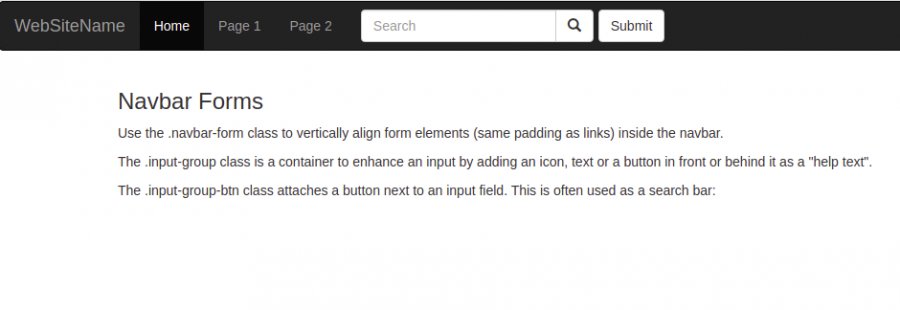
  <h3>Navbar Forms</h3>
  <p>Use the .navbar-form class to vertically align form elements (same padding as links) inside the navbar.</p>
  <p>The .input-group class is a container to enhance an input by adding an icon, text or a button in front or behind it as a \"help text\".</p>
  <p>The .input-group-btn class attaches a button next to an input field. This is often used as a search bar:</p>
</div>

</body>
</html>
code
نسخ
اقتباس
عرض
تنزيل
								<!DOCTYPE html>
<html lang=\"en\">
<head>
  <title>Bootstrap Example</title>
  <meta charset=\"utf-8\">
  <meta name=\"viewport\" content=\"width=device-width, initial-scale=1\">
  <link rel=\"stylesheet\" href=\"https://maxcdn.bootstrapcdn.com/bootstrap/3.4.1/css/bootstrap.min.css\">
  <script src=\"https://ajax.googleapis.com/ajax/libs/jquery/3.5.1/jquery.min.js\"></script>
  <script src=\"https://maxcdn.bootstrapcdn.com/bootstrap/3.4.1/js/bootstrap.min.js\"></script>
</head>
<body>

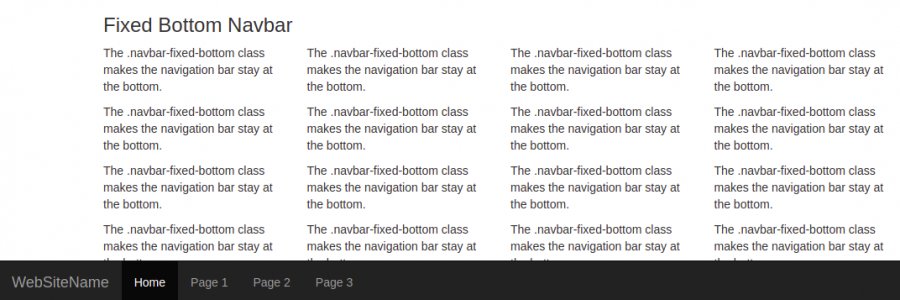
<nav class=\"navbar navbar-inverse navbar-fixed-bottom\">
  <div class=\"container-fluid\">
    <div class=\"navbar-header\">
      <a class=\"navbar-brand\" href=\"#\">WebSiteName</a>
    </div>
    <ul class=\"nav navbar-nav\">
      <li class=\"active\"><a href=\"#\">Home</a></li>
      <li><a href=\"#\">Page 1</a></li>
      <li><a href=\"#\">Page 2</a></li>
      <li><a href=\"#\">Page 3</a></li>
    </ul>
  </div>
</nav>

<div class=\"container\">
  <h3>Fixed Bottom Navbar</h3>
  <div class=\"row\">
    <div class=\"col-md-3\">
      <p>The .navbar-fixed-bottom class makes the navigation bar stay at the bottom.</p>
    </div>
    <div class=\"col-md-3\">
      <p>The .navbar-fixed-bottom class makes the navigation bar stay at the bottom.</p>
    </div>
    <div class=\"col-md-3\">
      <p>The .navbar-fixed-bottom class makes the navigation bar stay at the bottom.</p>
    </div>
    <div class=\"col-md-3\">
      <p>The .navbar-fixed-bottom class makes the navigation bar stay at the bottom.</p>
    </div>
    <div class=\"clearfix visible-lg\"></div>
  </div>
</div>

<div class=\"container\">
  <div class=\"row\">
    <div class=\"col-md-3\">
      <p>The .navbar-fixed-bottom class makes the navigation bar stay at the bottom.</p>
    </div>
    <div class=\"col-md-3\">
      <p>The .navbar-fixed-bottom class makes the navigation bar stay at the bottom.</p>
    </div>
    <div class=\"col-md-3\">
      <p>The .navbar-fixed-bottom class makes the navigation bar stay at the bottom.</p>
    </div>
    <div class=\"col-md-3\">
      <p>The .navbar-fixed-bottom class makes the navigation bar stay at the bottom.</p>
    </div>
    <div class=\"clearfix visible-lg\"></div>
  </div>
</div>

<div class=\"container\">
  <div class=\"row\">
    <div class=\"col-md-3\">
      <p>The .navbar-fixed-bottom class makes the navigation bar stay at the bottom.</p>
    </div>
    <div class=\"col-md-3\">
      <p>The .navbar-fixed-bottom class makes the navigation bar stay at the bottom.</p>
    </div>
    <div class=\"col-md-3\">
      <p>The .navbar-fixed-bottom class makes the navigation bar stay at the bottom.</p>
    </div>
    <div class=\"col-md-3\">
      <p>The .navbar-fixed-bottom class makes the navigation bar stay at the bottom.</p>
    </div>
    <div class=\"clearfix visible-lg\"></div>
  </div>
</div>

<div class=\"container\">
  <div class=\"row\">
    <div class=\"col-md-3\">
      <p>The .navbar-fixed-bottom class makes the navigation bar stay at the bottom.</p>
    </div>
    <div class=\"col-md-3\">
      <p>The .navbar-fixed-bottom class makes the navigation bar stay at the bottom.</p>
    </div>
    <div class=\"col-md-3\">
      <p>The .navbar-fixed-bottom class makes the navigation bar stay at the bottom.</p>
    </div>
    <div class=\"col-md-3\">
      <p>The .navbar-fixed-bottom class makes the navigation bar stay at the bottom.</p>
    </div>
    <div class=\"clearfix visible-lg\"></div>
  </div>
</div>

</body>
</html>