code
نسخ
اقتباس
عرض
تنزيل
								<!DOCTYPE html>
<html lang=\"en\">
<head>
  <title>Bootstrap Example</title>
  <meta charset=\"utf-8\">
  <meta name=\"viewport\" content=\"width=device-width, initial-scale=1\">
  <link rel=\"stylesheet\" href=\"https://maxcdn.bootstrapcdn.com/bootstrap/3.4.1/css/bootstrap.min.css\">
  <script src=\"https://ajax.googleapis.com/ajax/libs/jquery/3.5.1/jquery.min.js\"></script>
  <script src=\"https://maxcdn.bootstrapcdn.com/bootstrap/3.4.1/js/bootstrap.min.js\"></script>
</head>
<body>

<div class=\"container\">
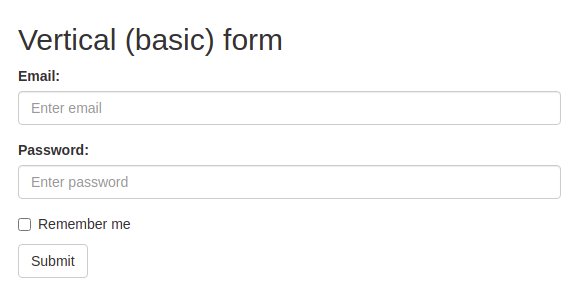
  <h2>Vertical (basic) form</h2>
  <form action=\"/action_page.php\">
    <div class=\"form-group\">
      <label for=\"email\">Email:</label>
      <input type=\"email\" class=\"form-control\" id=\"email\" placeholder=\"Enter email\" name=\"email\">
    </div>
    <div class=\"form-group\">
      <label for=\"pwd\">Password:</label>
      <input type=\"password\" class=\"form-control\" id=\"pwd\" placeholder=\"Enter password\" name=\"pwd\">
    </div>
    <div class=\"checkbox\">
      <label><input type=\"checkbox\" name=\"remember\"> Remember me</label>
    </div>
    <button type=\"submit\" class=\"btn btn-default\">Submit</button>
  </form>
</div>

</body>
</html>
code
نسخ
اقتباس
عرض
تنزيل
								<!DOCTYPE html>
<html lang=\"en\">
<head>
  <title>Bootstrap Example</title>
  <meta charset=\"utf-8\">
  <meta name=\"viewport\" content=\"width=device-width, initial-scale=1\">
  <link rel=\"stylesheet\" href=\"https://maxcdn.bootstrapcdn.com/bootstrap/3.4.1/css/bootstrap.min.css\">
  <script src=\"https://ajax.googleapis.com/ajax/libs/jquery/3.5.1/jquery.min.js\"></script>
  <script src=\"https://maxcdn.bootstrapcdn.com/bootstrap/3.4.1/js/bootstrap.min.js\"></script>
</head>
<body>

<div class=\"container\">
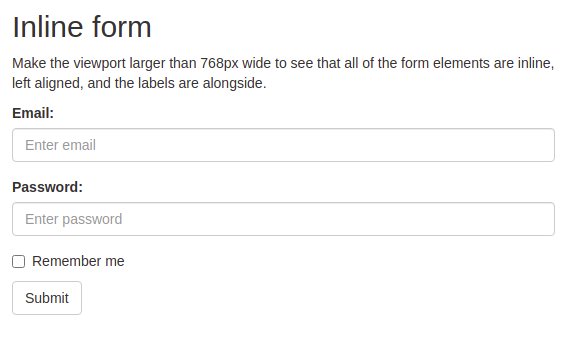
  <h2>Inline form</h2>
  <p>Make the viewport larger than 768px wide to see that all of the form elements are inline, left aligned, and the labels are alongside.</p>
  <form class=\"form-inline\" action=\"/action_page.php\">
    <div class=\"form-group\">
      <label for=\"email\">Email:</label>
      <input type=\"email\" class=\"form-control\" id=\"email\" placeholder=\"Enter email\" name=\"email\">
    </div>
    <div class=\"form-group\">
      <label for=\"pwd\">Password:</label>
      <input type=\"password\" class=\"form-control\" id=\"pwd\" placeholder=\"Enter password\" name=\"pwd\">
    </div>
    <div class=\"checkbox\">
      <label><input type=\"checkbox\" name=\"remember\"> Remember me</label>
    </div>
    <button type=\"submit\" class=\"btn btn-default\">Submit</button>
  </form>
</div>

</body>
</html>
code
نسخ
اقتباس
عرض
تنزيل
								<!DOCTYPE html>
<html lang=\"en\">
<head>
  <title>Bootstrap Example</title>
  <meta charset=\"utf-8\">
  <meta name=\"viewport\" content=\"width=device-width, initial-scale=1\">
  <link rel=\"stylesheet\" href=\"https://maxcdn.bootstrapcdn.com/bootstrap/3.4.1/css/bootstrap.min.css\">
  <script src=\"https://ajax.googleapis.com/ajax/libs/jquery/3.5.1/jquery.min.js\"></script>
  <script src=\"https://maxcdn.bootstrapcdn.com/bootstrap/3.4.1/js/bootstrap.min.js\"></script>
</head>
<body>

<div class=\"container\">
  <h2>Inline form with .sr-only class</h2>
  <p>Make the viewport larger than 768px wide to see that all of the form elements are inline, left aligned, and the labels are alongside.</p>
  <form class=\"form-inline\" action=\"/action_page.php\">
    <div class=\"form-group\">
      <label class=\"sr-only\" for=\"email\">Email:</label>
      <input type=\"email\" class=\"form-control\" id=\"email\" placeholder=\"Enter email\"  name=\"email\">
    </div>
    <div class=\"form-group\">
      <label class=\"sr-only\" for=\"pwd\">Password:</label>
      <input type=\"password\" class=\"form-control\" id=\"pwd\" placeholder=\"Enter password\" name=\"pwd\">
    </div>
    <div class=\"checkbox\">
      <label><input type=\"checkbox\" name=\"remember\"> Remember me</label>
    </div>
    <button type=\"submit\" class=\"btn btn-default\">Submit</button>
  </form>
</div>

</body>
</html>
code
نسخ
اقتباس
عرض
تنزيل
								<!DOCTYPE html>
<html lang=\"en\">
<head>
  <title>Bootstrap Example</title>
  <meta charset=\"utf-8\">
  <meta name=\"viewport\" content=\"width=device-width, initial-scale=1\">
  <link rel=\"stylesheet\" href=\"https://maxcdn.bootstrapcdn.com/bootstrap/3.4.1/css/bootstrap.min.css\">
  <script src=\"https://ajax.googleapis.com/ajax/libs/jquery/3.5.1/jquery.min.js\"></script>
  <script src=\"https://maxcdn.bootstrapcdn.com/bootstrap/3.4.1/js/bootstrap.min.js\"></script>
</head>
<body>

<div class=\"container\">
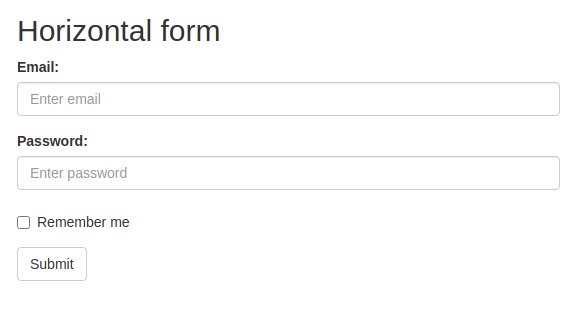
  <h2>Horizontal form</h2>
  <form class=\"form-horizontal\" action=\"/action_page.php\">
    <div class=\"form-group\">
      <label class=\"control-label col-sm-2\" for=\"email\">Email:</label>
      <div class=\"col-sm-10\">
        <input type=\"email\" class=\"form-control\" id=\"email\" placeholder=\"Enter email\" name=\"email\">
      </div>
    </div>
    <div class=\"form-group\">
      <label class=\"control-label col-sm-2\" for=\"pwd\">Password:</label>
      <div class=\"col-sm-10\">
        <input type=\"password\" class=\"form-control\" id=\"pwd\" placeholder=\"Enter password\" name=\"pwd\">
      </div>
    </div>
    <div class=\"form-group\">
      <div class=\"col-sm-offset-2 col-sm-10\">
        <div class=\"checkbox\">
          <label><input type=\"checkbox\" name=\"remember\"> Remember me</label>
        </div>
      </div>
    </div>
    <div class=\"form-group\">
      <div class=\"col-sm-offset-2 col-sm-10\">
        <button type=\"submit\" class=\"btn btn-default\">Submit</button>
      </div>
    </div>
  </form>
</div>

</body>
</html>